How can we help you?
Website Hosting Plans with EZ Host Pro for a $97 One-Time Payment Shared Hosting Plan with Fast Servers

One & Done Special Hosting Plan
Hosting plans costs can quickly add up, leaving many website owners and small businesses overpaying just to stay online. Expensive hosting plans and recurring fees often provide more than you actually need. If you’ve been searching for an affordable, dependable solution without sacrificing performance, there’s good news.
EZ Host Pro offers a smarter approach with a $97 one-time shared website hosting plan that allows you to manage up to 50 websites without ongoing monthly costs. It’s a simple, budget-friendly hosting plan option designed for people who want long-term value instead of endless payments.
What truly makes EZ Host Pro stand out is performance. Speed matters more than ever, and slow websites drive visitors away. EZ Host Pro’s optimized server environment ensures fast-loading pages that deliver a smooth, professional experience for your audience. When your site loads quickly, visitors stay longer, engage more, and are more likely to convert.
Reliability is just as important with hosting plans. Unexpected downtime can hurt credibility, sales, and search visibility. EZ Host Pro focuses on stability, helping keep your websites accessible around the clock so you don’t have to worry about outages during important moments.
Affordability is where this hosting plan really shines. Instead of paying month after month, the one-time $97 payment hosting plan gives you access to the features you need without long-term financial commitment. This makes it an excellent choice for entrepreneurs, bloggers, and small businesses looking to grow without unnecessary overhead.
If you’re ready to move away from overpriced hosting plans and recurring fees, EZ Host Pro offers a fast, reliable, and cost-effective way to manage multiple websites with confidence. Take advantage of this one-time offer and simplify your online setup today.
What to look at closely at prices with Big Guy companies
If you’re like many website owners, you may feel frustrated by companies that lock you into expensive monthly hosting plans for services you don’t fully use. Rising renewal costs, hidden fees, and unclear pricing structures can make managing your online presence more stressful than it needs to be. The good news is that there’s a more transparent and affordable alternative.
EZ Host Pro‘s hosting plans offer a cost-effective solution designed to save you money long term—without sacrificing performance or reliability. Instead of ongoing monthly charges, EZ Host Pro focuses on straightforward pricing that helps you plan ahead and avoid surprise increases.
When comparing hosting plan providers such as GoDaddy, HostGator, Bluehost, Hostinger, and Ionos, it’s important to look beyond the introductory offer. Many large companies advertise extremely low first-term pricing, only to raise rates significantly at renewal. What starts as a $0.99 monthly deal can quickly jump to $10.99 or more, creating a long-term cost that far exceeds expectations. The same pattern often applies to domain registrations, where renewal prices are much higher than the initial purchase.
EZ Host Pro takes a different approach. When you sign up during a promotional period, your rate remains consistent after the promotion ends. The same philosophy applies to domain registrations—prices stay stable unless provider costs increase. Rather than inflating renewals, EZ Host Pro adjusts pricing only when absolutely necessary to cover upstream changes.
In addition to predictable pricing, EZ Host Pro delivers strong performance and reliability. Fast SSD-powered infrastructure, high uptime, and one-click access to popular scripts and tools help ensure your websites load quickly and remain available to visitors around the clock. This combination supports better user experiences, improved engagement, and long-term growth.
Because maintaining an online presence is essential for businesses of all sizes, EZ Host Pro focuses on delivering dependable service without unnecessary complexity or inflated costs. With responsive support and a performance-driven environment, it provides a practical solution for entrepreneurs, small businesses, and growing websites that want stability, speed, and value—without the usual pricing surprises.
For example, the image below is from HostGator’s hosting plans, you can see the plans special price is great $4.50 but, when you renew and the ongoing price changes to $16.49 mo. That is a difference of $11.99 a month. Which is $143.88 per year difference.
At EZ Host Pro we do not hike up the hosting plan price the way that all the other big hosting companies do. We are upfront with the hosting plan prices and are adamant to keep our prices affordable especially for the small businesses and individuals who need affordable hosting plan rates.

What is EZ Host Pro and their $97.00 one-time payment shared hosting plan?
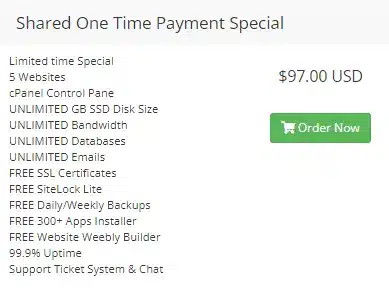
EZ Host Pro is a website hosting plan provider that offers a unique and affordable hosting solution for individuals and businesses. One of their standout offerings is their $97 one-time payment shared hosting plan, which allows users to host up to 5 websites without the burden of recurring monthly fees. This hosting plan provides all the features and benefits of premium hosting at a fraction of the cost.
With EZ Host Pro’s shared hosting plan, you can enjoy the convenience of managing multiple websites from a single control panel. This makes it easy to streamline your website management process and save time. Whether you’re a small business owner, an entrepreneur, or an individual looking to host multiple websites, this plan offers excellent value for money.
In addition to the convenience and cost-effectiveness of EZ Host Pro’s shared hosting plan, it also offers a range of features that make it an ideal choice for website owners. The Benefits of EZ Host Pro’s $97.00 One-Time Payment Plan. There are several advantages to choosing EZ Host Pro’s $97 one-time payment shared hosting plan.
Let’s explore some of these benefits
Affordability: Breaking the Barrier of Expensive Hosting Plan
One of the biggest advantages of EZ Host Pro’s one-time payment hosting plan is its long-term affordability. Many website owners are accustomed to monthly or yearly subscriptions that seem inexpensive at first but steadily increase over time. These recurring charges can become a significant expense, especially when managing multiple websites. With this approach, a single payment of $97 provides continued access for up to 50 websites, eliminating ongoing fees and making costs far more predictable.
This pricing structure is especially appealing for small businesses, startups, and entrepreneurs who need to manage budgets carefully. Instead of committing to endless payments, you can make a one-time investment and focus your resources on growth, marketing, and improving your online presence. Knowing your costs upfront removes uncertainty and helps with long-term planning.
Affordability does not mean cutting corners. This plan is designed for users who want reliable performance, consistent availability, and a smooth experience without unnecessary extras or inflated pricing. It’s a practical solution for anyone looking to maintain multiple websites while keeping expenses under control and avoiding the frustration of recurring bills.
Affordable Hosting for Small Businesses and Entrepreneurs
Small businesses and entrepreneurs often operate with tight budgets, making it essential to choose solutions that deliver real value without unnecessary costs. While speed and reliability are critical for maintaining a professional online presence, recurring expenses can quickly become a burden—especially for growing businesses managing multiple priorities.
EZ Host Pro’s one-time payment plan is designed with these challenges in mind. Instead of locking users into ongoing fees, it offers a practical alternative that provides dependable performance and fast server response at a predictable cost. This approach removes financial uncertainty and helps business owners plan more confidently without worrying about rising expenses over time.
By reducing overhead, businesses can redirect their resources toward areas that drive growth, such as marketing, content creation, customer engagement, and product development. A stable online foundation allows entrepreneurs to focus on reaching their target audience, building credibility, and scaling operations at their own pace.
This cost-effective model makes it easier for small businesses to compete online, establish trust with visitors, and maintain a strong digital presence—without sacrificing quality or stretching limited financial resources.
Lightning-Fast Servers for Quick Website Load Times
Website loading speed plays a critical role in user experience, engagement, and search engine performance. When pages take too long to load, visitors are more likely to leave before interacting with your content, leading to higher bounce rates and reduced visibility in search results. Fast, responsive websites create stronger first impressions and encourage users to stay longer and explore more.
EZ Host Pro is built on a performance-driven infrastructure designed to deliver quick page delivery and smooth browsing experiences. One of the key technologies behind this speed advantage is LiteSpeed Technologies, a modern web server known for its efficiency and ability to handle high traffic with minimal resource usage. LiteSpeed is designed to process requests faster than traditional server software, helping websites respond quickly even during peak demand.
LiteSpeed also includes advanced caching capabilities that store frequently accessed content and deliver it instantly to visitors. This reduces server load and dramatically improves page load times, especially for content-heavy websites and repeat visitors. Faster delivery means users can access information without delays, creating a smoother and more enjoyable experience.
In addition to LiteSpeed, EZ Host Pro utilizes HTTP/3 with QUIC, a next-generation protocol designed to reduce latency and improve website delivery. Unlike older protocols, HTTP/3 allows multiple requests to be processed in parallel without blocking, which significantly speeds up how content is delivered to users. This is especially beneficial for modern websites that load images, scripts, and styles simultaneously.
HTTP/3 also includes forward error correction, which helps minimize delays caused by packet loss. Instead of waiting for retransmissions, data can continue flowing smoothly, resulting in more consistent performance—particularly for users on mobile networks or less stable connections. The result is a faster, more reliable browsing experience across devices and locations.
Together, LiteSpeed and HTTP/3 work seamlessly to reduce latency, improve responsiveness, and ensure content reaches visitors quickly. These technologies help websites load faster, feel smoother, and perform more reliably, which directly contributes to higher user satisfaction and stronger engagement.
Fast-loading websites don’t just benefit visitors—they also support better search engine performance. Search engines favor websites that provide quick, reliable experiences, making speed a key factor in long-term visibility. By leveraging this advanced technology stack through EZ Host Pro’s one-time payment plan, you can deliver exceptional performance and stay competitive in an increasingly speed-focused digital landscape.

Lightning-Fast Servers for Quick Website Load Times
Website loading speed is crucial for user experience and search engine optimization. Slow-loading websites can lead to high bounce rates and negatively impact your online visibility. With EZ Host Pro’s lightning-fast servers, you can ensure that your websites load quickly, providing a seamless browsing experience for your visitors.
Accelerate your website’s loading time with our incredible technology stack. HTTP-3 with Quick reduces latency and speeds up website delivery due to improved parallelization. Having a quick loading website is vital in providing your visitors with a top-notch viewing experience.
Your website will experience a significant boost in loading time, leading to enhanced user satisfaction. The advanced parallelization capabilities of this technology stack work effortlessly in reducing latency, ensuring that your website’s content reaches your visitors at lightning-fast speeds.
Additionally, HTTP-3 incorporates forward error correction to mitigate packet loss and retransmission delays. As a result, HTTP-3 technology promises to revolutionize web browsing by providing a faster and more reliable experience for users around the world.
With a quick-loading website, you can guarantee a seamless browsing experience for your users, keeping them engaged and eager to explore what your website has to offer. Don’t miss out on the opportunity to provide your visitors with a top-notch viewing experience that will set your website apart from the competition.
Fast-loading websites not only enhance user satisfaction but also improve your chances of ranking higher in search engine results. By choosing EZ Host Pro’s one-time payment plan, you can optimize your website’s performance and stay ahead of the competition.
The importance of fast website loading speed
In today’s digital landscape, where attention spans continue to shrink, website loading speed plays a major role in how visitors interact with your site. Users expect pages to load quickly, and even small delays can cause frustration. When a site takes too long to display content, visitors are far more likely to leave and look for faster alternatives—often without giving the business a second chance.
Slow performance doesn’t just affect usability; it can also damage how your brand is perceived. A sluggish website may appear outdated, unreliable, or poorly maintained, which can raise doubts about the professionalism of the business behind it. For potential customers, this negative first impression can be enough to send them elsewhere, resulting in lost opportunities and reduced trust.
Fast-loading websites, on the other hand, create a smooth and positive experience from the very first interaction. Visitors are more likely to stay longer, explore additional pages, and engage with content when everything responds quickly. This increased engagement naturally leads to higher conversion rates, stronger credibility, and better overall results.
By using EZ Host Pro’s one-time payment plan with performance-focused server infrastructure, businesses can deliver a responsive browsing experience that meets modern expectations. Faster load times help keep visitors engaged, support long-term growth, and encourage users to return—making speed a powerful advantage rather than a liability.
The benefits of reliable website hosting
Reliability is one of the most important factors to consider when choosing a provider to support your online presence. Unexpected downtime can disrupt operations, interrupt customer access, and lead to lost sales opportunities. Even brief outages can negatively affect how customers perceive your business, making reliability essential for maintaining trust and credibility.
EZ Host Pro recognizes how critical consistent availability is for businesses of all sizes. A stable environment helps ensure visitors can access your website whenever they need it—whether they are browsing, making a purchase, or contacting your team. Consistency behind the scenes plays a major role in delivering a smooth and professional user experience.
With a 99.9% uptime guarantee, EZ Host Pro is built to keep websites accessible around the clock. This high level of availability minimizes interruptions and helps protect your brand’s reputation. Visitors are more likely to trust and return to websites that are dependable and always available.
By reducing downtime and maintaining steady performance, EZ Host Pro helps businesses focus on growth instead of worrying about interruptions. Reliable availability supports customer confidence, protects revenue, and ensures your online presence remains strong and dependable day after day.
Reliable Uptime Guarantee for Website Availability
EZ Host Pro’s one-time payment plan is built around consistent availability, helping ensure your websites remain accessible whenever visitors need them. Unplanned outages can interrupt customer journeys and weaken confidence, so minimizing downtime is essential for maintaining a dependable online presence.
With a strong uptime commitment in place, your websites stay available day and night, supporting smooth browsing, uninterrupted access, and reliable performance. Visitors can view content, submit inquiries, or complete purchases without encountering errors or delays that could drive them away.
This level of consistency plays a key role in building trust. When users know they can rely on your site to work properly every time they visit, confidence in your brand naturally increases. Over time, dependable availability contributes to stronger customer satisfaction, improved engagement, and more favorable business outcomes.
By keeping interruptions to a minimum, EZ Host Pro allows you to focus on growth and customer experience rather than worrying about accessibility issues. A stable online presence helps reinforce credibility and ensures your website continues to support your business goals without disruption.
Purchasing and changing your Nameserver for your Domain Name
One important difference with EZ Host Pro is how domain name pricing and renewals are handled. Because we are a smaller business, we do not rely on extreme first-year discounts followed by large renewal increases.
When you register a domain name with us, the renewal price generally remains the same as what you initially paid. The only time a price changes is if the domain registry itself increases the base cost, which applies industry-wide and is outside of our control.
Any discounted prices you see are registry-provided promotions, not artificially lowered rates designed to increase later. Once a promotional period ends, the price simply returns to its normal rate—without dramatic jumps. In many cases, our standard renewal pricing is actually lower than the regular renewal rates charged by larger providers, even after their introductory offers expire.
This transparent approach makes long-term planning easier for businesses and website owners. Instead of worrying about unexpected increases year after year, you can confidently manage your domain knowing that pricing remains fair and predictable. Our goal is to offer stability and honesty, not short-term gimmicks that lead to frustration later.
You can view our full list of available extensions and current pricing on our Domain Names page, where promotional rates and standard prices are clearly displayed so there are no surprises at renewal time.
In addition, if you transfer your existing domain name to EZ Host Pro, your renewal pricing is updated to our current rate once the transfer is complete. This means you are no longer locked into higher renewal costs from another provider. In many cases, customers discover that our renewal rates are lower than what they were previously paying, especially if they were coming from large companies that raise prices significantly after the first term.
Transferring a domain is a simple process, and it can result in immediate long-term savings. Once the domain is under your EZ Host Pro account, future renewals follow the same transparent pricing structure—stable, predictable, and only adjusted if the domain registry itself changes its base cost. There are no surprise markups or inflated renewal fees added later.
This makes transferring your domain a smart option for businesses looking to reduce ongoing expenses while consolidating everything in one place. You can review available extensions, pricing details, and transfer options anytime on our Domain Names page to see how switching can benefit you over the long term.
Tips for Choosing a Domain Name for your business or blog
Choosing the right domain name plays a major role in shaping your online identity. It’s often the first thing people see, and it can influence how easily your brand is remembered and trusted. A strong choice helps visitors recognize your business or blog instantly and makes it easier for them to return in the future.
Start by keeping the name short, clear, and easy to spell. Shorter names are easier to remember, quicker to type, and less likely to be mistyped. Simplicity is key—if someone hears your name once, they should be able to recall it without effort. Avoid overly complex words or unusual spellings that could confuse potential visitors.
Your name should also reflect what your business or blog is about. When people see it, they should have a general idea of what to expect. This helps set expectations and builds trust before they even visit your site. A name that aligns with your brand, niche, or message creates a stronger connection with your audience.
It’s best to avoid numbers and hyphens whenever possible. These elements can make a name harder to remember and often lead to confusion when spoken aloud. Instead, aim for a clean, professional structure that looks and sounds credible.
Including relevant terms related to your niche can also be helpful, especially for clarity and discoverability. Just be careful not to force it—natural and brand-friendly always works better than awkward or overly stuffed wording. Lastly, choose an extension that fits your goals and audience. Popular options like .com are widely trusted, while others may work well for specific industries or communities.
By taking the time to choose thoughtfully, you can secure a name that supports your brand, improves recognition, and helps you stand out online for years to come.
Take Your Websites to the Next Level with EZ Host Pro
If you’re searching for an affordable and dependable solution that delivers strong performance without unnecessary costs, EZ Host Pro offers a smart alternative. Their $97 one-time shared website hosting plan is designed for users who want long-term value without being tied to recurring monthly fees. With this plan, you can manage up to 50 websites while keeping expenses predictable and under control.
Performance is a key part of the experience. EZ Host Pro’s optimized server environment supports fast load times, helping websites respond quickly and smoothly for visitors. Faster performance improves usability, keeps users engaged, and supports better visibility across search engines.
Consistency is just as important as speed. With a strong uptime commitment in place, your websites remain accessible around the clock, allowing visitors to browse, interact, and convert without interruptions. Reliable availability helps protect your brand’s reputation and builds trust with your audience over time.
There’s no reason to let expensive plans or ongoing fees slow your progress. EZ Host Pro’s hosting plan with a one-time payment model gives you access to the features and reliability you need without long-term financial pressure. If you’re ready to grow your online presence with confidence, this plan provides a practical, cost-effective path forward.
Get started today and give your websites the foundation they need to perform, scale, and succeed.